LPT programming example in C for ubuntu linux
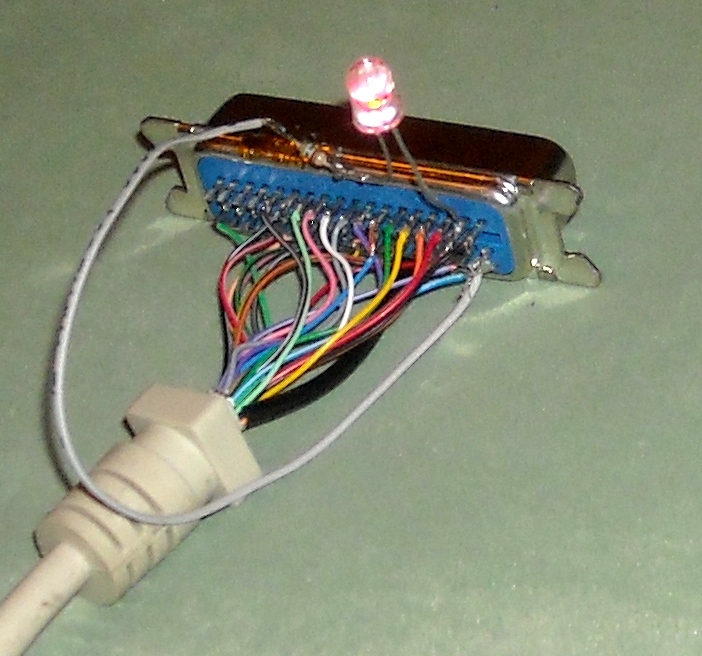 A while back I wanted to try out LPT printer port programming for upcoming project.
After hours of learning, testing and searching, I came up with fallowing piece of code what finally worked for me.
This example code makes LED blink in rate of 2 blinks per second wich is soldered between ground and any of the data pins.
A while back I wanted to try out LPT printer port programming for upcoming project.
After hours of learning, testing and searching, I came up with fallowing piece of code what finally worked for me.
This example code makes LED blink in rate of 2 blinks per second wich is soldered between ground and any of the data pins.
#include <stdio.h>
#include <stdlib.h>
#include <unistd.h>
#include <sys/io.h>
#include <sys/types.h>
#include <fcntl.h>

#define BASEPORT 0x378 /* lp1 */

int main() {
	char c;
	int n, tem;

	printf("Hit any key to stop\n");

	//set permissions to access port
	if (ioperm(BASEPORT, 3, 1)) {perror("ioperm"); exit(1);}

	tem = fcntl(0, F_GETFL, 0);
	fcntl (0, F_SETFL, (tem | O_NDELAY));

	//main loop where actual blinking is done
	while (1) {
		//if some key is pressed, break out from loop
		n = read(0, &c, 1);
		if (n > 0) break;

		//write 'on' bit on all data pins and wait 1/4 second
		outb(255, BASEPORT);
		usleep(250000);

		//write 'off' bit on all data pins and wait 1/4 second
		outb(0, BASEPORT);
		usleep(250000);
	}

	fcntl(0, F_SETFL, tem);
	outb(0, BASEPORT);

	//take away permissions to access port
	if (ioperm(BASEPORT, 3, 0)) {perror("ioperm"); exit(1);}

	exit(0);
}
I compiled it with command where lpt.c is source code and lpt is program name compiled.
gcc lpt.c -O2 -o lpt
After that check that program has excecute permissions and run it with command.
./lpt
I used LED with 550 ohms resistor in series and soldered them between pin 2 and 20 to test out this program. It worked fine.
You may also like to check out these links
- Video of this code running
- Linux I/O port programming mini-HOWTO
- Parallel port pin-out picture can be found here
Categories:
Programming
- Linux
I think it should, but maybe it is changing too fast for multimeter to register the voltage drop? With LED would be much better to see it.
but my light is still blind
Why?
the code works..
J.W. from Hungary.
This saved me tons of time.
Cheers!
My article is old and I can't remember much of the stuff going on here.
i was trying to test the port for two days finally i got your post.....i'm happy
I had to run the code with
sudo ./ltp
to aviod ioperm error.
sudo gcc lpt.c -O2 -o lpt
sudo ./lpt
I'm using your code and I'm fascinated from the simplicity and functionality but can you give me a short explanation what the file operation commands {fcntl (0, F_SETFL, (tem | O_NDELAY))....} are good for, since no file is beeing opened ?
tnx
Susi
printf("writing data");
outb(); // write some data
sleep(2);
outb();
sleep(2);
printf("write complete");
Output : writing data write complete.
#define BASEPORT 0x378 /* lp1 */
put in code
#define BASEPORT 0x278 /* lp1 */
just see bios setings